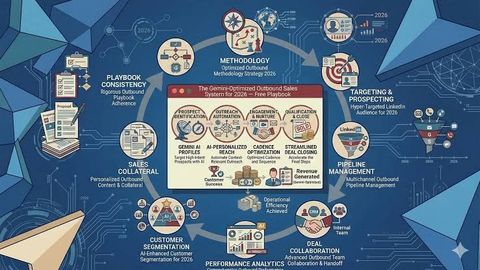
How to Automate Outbound Sales and Boost Business Growth
Automating outbound sales can simplify business development processes.
Automate Outbound Sales
Outbound sales automation uses software and predefined workflows to manage repetitive activities, including prospect research, email outreach, follow-ups, and lead organization. Businesses exploring outbound sales automation software often want to reduce manual work while maintaining consistent communication with potential customers.
This approach combines technology with human decision-making. Automation can organize communication and identify useful opportunities, but sales professionals still need to understand customer requirements, answer questions, and build relationships. When implemented carefully, these processes can support more organized sales operations and business growth.
What Is Outbound Sales Automation?
Outbound sales automation refers to using digital tools to manage parts of the sales process. Instead of manually completing every task, businesses can establish workflows that perform routine activities according to selected rules.
Common automated activities include:
Organizing contact information and prospect lists.
Sending scheduled sales emails.
Creating reminders for follow-up communication.
Updating customer relationship management records.
Tracking responses and engagement.
Assigning leads to relevant sales representatives.
The purpose is to make sales activities more structured without removing the personal communication needed to understand potential customers.
Why Businesses Are Adopting Sales Automation
Manual prospecting can require considerable time, especially when sales teams manage large contact lists. Repeating similar tasks across multiple communication channels can also create inconsistent records and missed follow-ups.
Outbound sales automation tools help organize these activities within a connected system. Businesses can establish repeatable processes, monitor communication, and give sales representatives more time to focus on meaningful conversations.
Importance of Outbound Sales Automation for Business Growth
A well-organized outbound sales process can support business development by making prospecting and communication easier to manage. Automation helps businesses maintain consistent workflows and understand how potential customers interact with their outreach.
However, software alone does not create business growth. Results also depend on product relevance, audience research, communication quality, pricing, and the ability to address customer needs.
Improving Sales Team Productivity
Sales representatives often spend time researching prospects, updating spreadsheets, writing similar emails, and scheduling follow-ups. Automating suitable repetitive activities can reduce administrative work.
For example, a sales engagement platform can schedule communication and display previous interactions. Representatives can then review the information before contacting a prospect personally.
Maintaining Consistent Follow-Ups
Follow-up communication is an important part of outbound sales. Without organized reminders, potential opportunities may receive delayed responses or become difficult to track.
Automated workflows can schedule follow-up tasks based on predefined conditions. Sales teams should still review communication history and adjust messages to avoid unnecessary or repetitive contact.
Improving Lead Management
Outbound lead generation software can help collect, organize, and categorize prospect information. Businesses can use selected criteria, such as industry, company size, location, or business requirements, to organize potential customers.
Better lead organization makes it easier to identify relevant prospects and direct sales efforts toward appropriate audiences.
How to Automate Outbound Sales
Successful automation begins with a clear process rather than purchasing multiple tools immediately. Businesses should identify repetitive tasks, define their target audience, and select software that supports their existing sales operations.
Define Your Target Audience
The first step is understanding which businesses or individuals may benefit from the product or service. A clear audience profile helps sales teams avoid contacting unrelated prospects.
Useful criteria may include:
Industry and business category.
Company size and operating location.
Professional roles and responsibilities.
Common business challenges.
Potential requirements for the product or service.
Accurate audience research makes outreach more relevant and helps businesses use their resources responsibly.
Choose Suitable Automation Software
The next step is comparing available outbound sales automation software options. Different platforms provide different features, so businesses should identify their operational requirements before selecting a solution.
Important features may include email scheduling, CRM integration, contact management, workflow automation, reporting, and team collaboration.
Create Personalized Outreach Campaigns
Automation should support relevant communication rather than send identical messages to every prospect. Businesses can create message templates and personalize suitable details, such as company names, professional roles, or identified business requirements.
Personalization should be based on accurate information. Messages should clearly explain their purpose and provide an appropriate way for recipients to stop receiving further communication.
Set Up Automated Follow-Ups
Businesses can establish follow-up sequences that operate according to predefined schedules. For example, a prospect may receive an initial introduction, followed by a relevant follow-up if no response is received.
These sequences should include reasonable limits and stopping conditions. If someone replies, declines further communication, or unsubscribes, the workflow should respond appropriately.
Comparing Outbound Sales Automation Tools
Choosing the right platform depends on business size, workflow complexity, and available resources. The following table outlines common software categories and their typical uses.
| Software category | Main purpose | Suitable business need |
|---|---|---|
| CRM software | Organizes customer information | Lead and relationship management |
| Email automation tools | Schedules email communication | Structured email outreach |
| Sales engagement platforms | Coordinates multiple sales activities | Managing outreach sequences |
| Lead generation software | Finds and organizes prospects | Prospect research |
| AI sales automation tools | Assists with selected sales tasks | Research and workflow support |
When comparing the best outbound sales automation tools, businesses should also consider ease of use, integration options, customer support, data protection, and available reporting features.
Understanding Costs and Implementation
Outbound sales software pricing varies according to features, contact limits, user accounts, integrations, and subscription arrangements. Some platforms offer basic plans, while advanced systems may include additional reporting and workflow capabilities.
Factors That Influence Software Costs
Businesses should review several cost considerations before purchasing a platform:
Subscription structure: Monthly and annual plans may have different pricing arrangements.
User limits: Some platforms charge according to the number of team members.
Contact volume: Certain services have limits on stored contacts or outreach activities.
Additional features: Advanced automation, reporting, and integrations may require higher plans.
Implementation: Training, setup, and data migration can create additional expenses.
A suitable platform should match actual operational requirements rather than simply offer the largest number of features.
Measuring Business Performance
Regular performance reviews help businesses understand whether automation supports their sales objectives. Useful measurements include email delivery rates, response rates, qualified leads, booked meetings, conversion rates, and customer acquisition costs.
These measurements should be considered together. For example, a high email response rate does not necessarily indicate that a campaign generates qualified business opportunities.
Challenges and Best Practices
Although automation can improve organization, poor implementation may create communication problems. Incorrect contact information, irrelevant messages, excessive follow-ups, and weak data management can affect customer trust.
Businesses should follow these practices:
Keep prospect information accurate and updated.
Review automated messages before launching campaigns.
Respect communication preferences and unsubscribe requests.
Follow applicable privacy and electronic communication regulations.
Monitor campaign performance regularly.
Maintain human involvement in important customer conversations.
Businesses using AI outbound sales tools should also review generated information for accuracy and avoid relying on automated systems for unsupported claims or decisions.
Frequently Asked Questions
What Is the Best Outbound Sales Automation Software?
The best option depends on business requirements, team size, budget, and existing systems. Businesses should compare features, integrations, usability, and reporting before making a decision.
How Much Does Outbound Sales Automation Cost?
Outbound sales software pricing varies by provider, subscription plan, number of users, and available features. Reviewing the complete pricing structure helps businesses understand potential expenses.
Can Small Businesses Use Sales Automation?
Yes. Small businesses can automate basic activities such as contact organization, email scheduling, and follow-up reminders. Starting with essential features can help keep implementation manageable.
Do AI Outbound Sales Tools Replace Sales Representatives?
No. These tools can assist with research, communication preparation, and repetitive activities, but human involvement remains important for relationship building, negotiation, and understanding customer needs.
How Long Does Sales Automation Take to Implement?
Implementation time depends on software complexity, existing data, integrations, and team training requirements. Basic workflows may be established relatively quickly, while larger systems can require more planning.
Conclusion
Outbound sales automation can help businesses organize prospecting, manage communication, and reduce repetitive administrative activities. Selecting appropriate software, developing relevant outreach strategies, and monitoring performance are important parts of implementation.
Businesses should treat automation as a support system rather than a replacement for meaningful customer relationships.

Related Post...